← All posts
If you have deployed macOS enrollment in Intune you might be wondering how we refresh macOS devices to keep mimicking all changes during the validation process.
- Go to Microsoft Intune admin center
- Go to Devices
- Click macOS
- Search for the targeted device (by user name, device serial number)
Make sure you’re targeting the right device
- Double check device by Name and Serial Number
- Go to Microsoft Intune admin center
- click on Devices
- click on macOS
- under macOS Devices (main tab)
- Search for your macOS device by Name, Serial Number or user upn
- click on the device
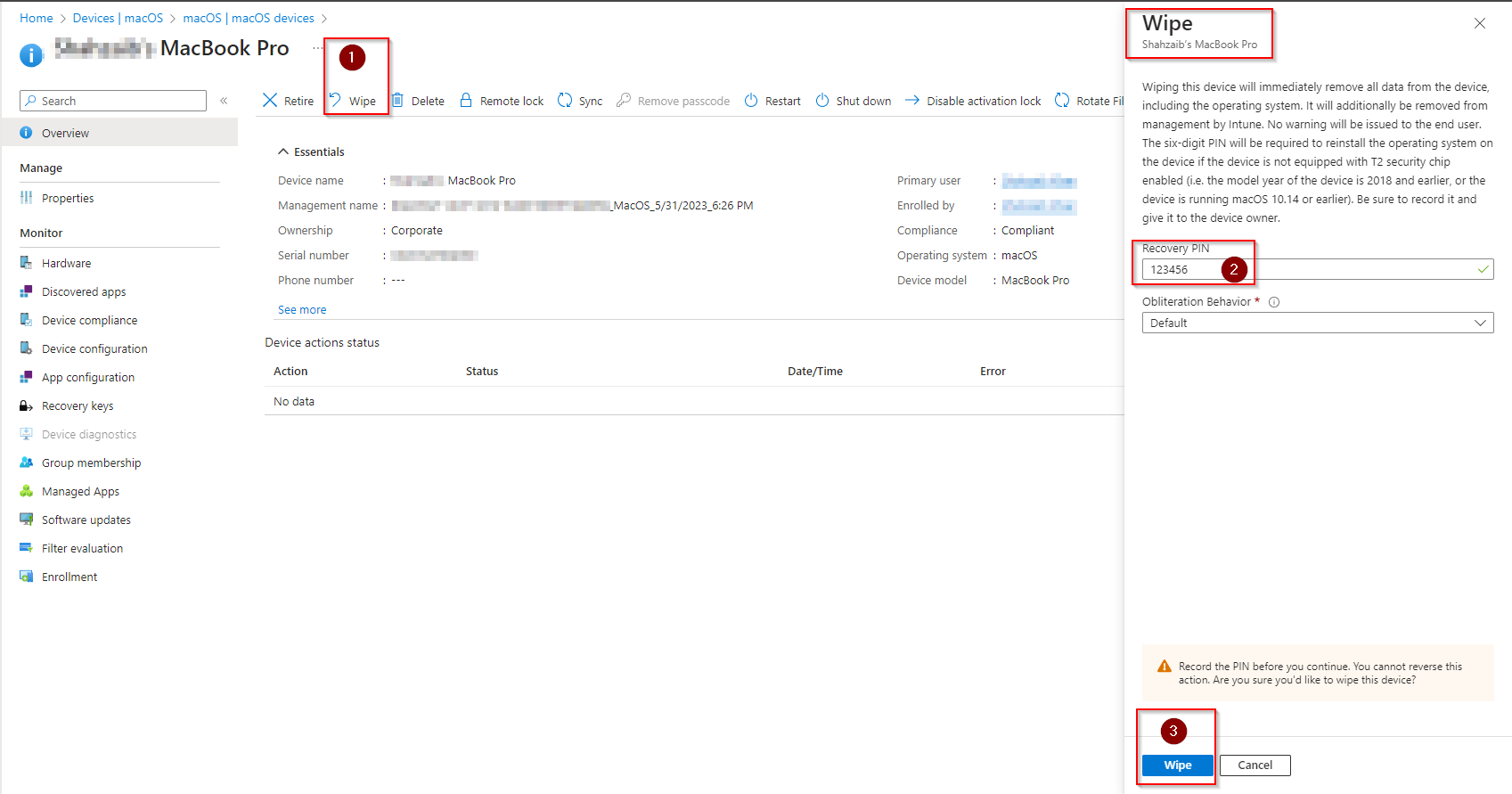
- click Wipe (previously known as retire option)
- under Wipe’e tab
- set a “Recover PIN” ( used 123456 – check the screenshot below )
- then select the “Obliteration Behavior”
you have 4 options there, in my tests for Enterprise solution I used Default
- Default: If Erase All Content and Settings (EACS) preflight fails, the device responds to Intune with an Error status and then attempts to erase itself. If EACS preflight succeeds but EACS fails, then the device attempts to erase itself.
- Do not obliterate: If Erase All Content and Settings (EACS) preflight fails, the device responds to Intune with an Error status and doesn’t attempt to erase itself. If EACS preflight succeeds but EACS fails, then the device doesn’t attempt to erase itself.
- Obliterate with warning: If Erase All Content and Settings (EACS) preflight fails, the device responds with a Success status and then attempts to erase itself. If EACS preflight succeeds but EACS fails, then the device attempts to erase itself.
- Always obliterate: The system doesn’t attempt Erase All Content and Settings (EACS). T2 and later devices always obliterate.
- click Wipe to confirm
- the device will show as “wipe pending” after you get the “wipe initiated” notification
- after a while, the referred or targeted object won’t be available under Intune \ Devices
user or local IT is ready to proceed with the device setup assistant
this option does not require re-running Apple Configurator Tool (ACT) we assume the device is already registered in ABM and with a profile assigned in Intune (Microsoft Intune Enrollment program tokens)
reference
Wipe a macOS device – Microsoft Intune | Microsoft Learn
Cheers,
Thiago Beier
Originally published at thebeier.com